
Faceless Video Script Template: Two Examples You Can Adapt
A fill-in structure for narrated shorts, with complete examples, scene notes and an editing pass that removes promises the video can't deliver.
A script template should leave you with fewer decisions, not a page full of dramatic phrases you wouldn't say aloud.
For a narrated short, I'd start with one useful idea and a way to show it. Then I'd write the words around that picture. You don't need a mysterious opening, a made-up statistic or a promise to change someone's life before the video ends.
Below is a reusable faceless video script template, followed by two original examples. One explains a simple process. The other demonstrates a small organizational habit. They're writing examples, not tested formulas for views, and you can change the structure when your subject needs something different.
Disclosure: I built Vidmoro, which can turn a reviewed script and scene plan into a narrated short. The writing advice here doesn't depend on using it.
Start with the promise, not the opening line
Before drafting, write a private note: "This video helps [viewer] do or understand [one thing]."
For example: "This video helps someone organizing their laptop create a place for files they haven't sorted yet."
That gives you a boundary. A video about making an inbox folder doesn't also need to cover backups, cloud storage, security and naming every document. Those may deserve separate explanations. Trying to include them all makes this particular script harder to finish.
The note is for you, not necessarily for the voiceover. The viewer doesn't need to hear your planning document. They need to recognize their problem and see what to do next.
If you're still choosing a subject, use the faceless channel ideas guide as a starting point, then narrow one idea to a single lesson.
The fill-in faceless video script template
Copy this into a document. Replace every bracket with something specific before producing the video.
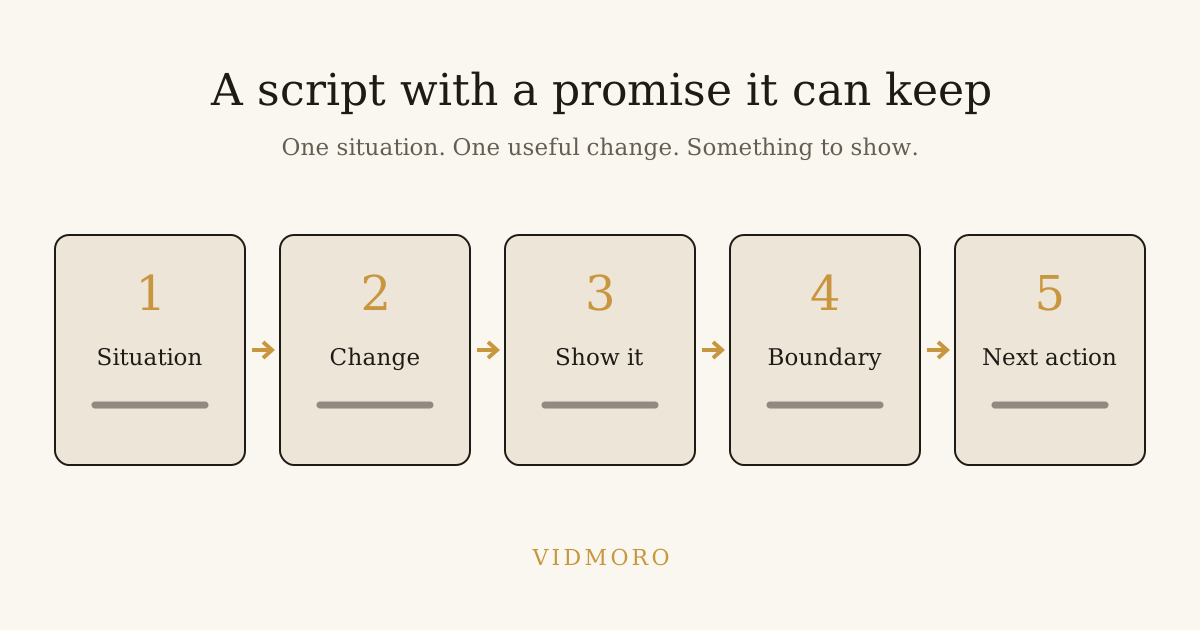
Recognizable situation: [Name a small problem the viewer can picture.]
Useful change: [Say what you'll do differently, without an exaggerated result.]
Demonstration: [Show the first action, then the next. Explain any choice the viewer must make.]
Boundary: [Name the limitation, exception or common misunderstanding.]
Finish: [Deliver the answer and give one relevant next action.]
I like including a boundary because it forces an honest sentence into the draft. A folder doesn't organize itself. A packing checklist doesn't guarantee you won't forget anything. A study technique doesn't promise a grade.
You don't have to announce the boundary as a disclaimer. Work it into the explanation so the viewer understands what the advice can and can't do.
The structure is a writing aid, not a reason to make every video sound identical. Some subjects need the answer immediately. Others need a demonstration before the explanation. Keep the parts that make the lesson clearer.
Example 1: A digital inbox folder
Private promise: Help someone collect unsorted files in one place without pretending that moving them finishes the organizing work.
Original narration draft:
If every download ends up on your desktop, give the unsorted files one temporary home.
Make a folder called "Inbox." Move the files you're not ready to sort into it, rather than creating a new pile beside yesterday's pile.
Then choose a time to empty it. Open each file, decide whether to keep it, and move what you need into a folder named for the project it belongs to.
The inbox isn't an archive. It's a waiting room. If you never come back, you've only hidden the clutter.
Try it with the loose files from one project first. Keep the system small enough that you'll actually review it.
Notice that the opening names the situation rather than saying "Here are five life-changing productivity hacks." The middle shows the action. The waiting-room line carries the limitation. The ending returns to a manageable task.
For visuals, you could use an illustrative desktop rather than a recording of private files. If you record your real screen, check filenames, notifications and account details before publishing. There's no reason for a tutorial about folders to expose a client's document title.
Example 2: A packing-list rehearsal
This version uses a different situation but the same underlying structure.
Private promise: Help someone build a first draft of a packing list by mentally walking through part of a day.
Original narration draft:
A blank packing list can be harder to start than a morning routine.
Picture waking up on your trip. What do you reach for first? Write down what you need to get dressed, wash and get ready to leave.
Now picture the first activity you've actually planned. Add the items that activity needs, rather than packing for every possible holiday at once.
This is a first pass, not a complete travel checklist. Check the weather, your plans and any rules that apply to what you're carrying separately.
Start with the first morning. Once that's on paper, walk through the next part of the day and fill the gaps.
The script avoids declaring a universal packing list. A work trip, camping weekend and family visit have different requirements. The example teaches a way to begin, then tells the viewer what still needs checking.
I'd show ordinary objects and a handwritten list here. I wouldn't fill the background with unrelated airport footage just because the topic involves travel. Each shot should have a job in this explanation.
Make a scene plan beside the words
A faceless script has two tracks: what the listener hears and what the viewer sees. Review them together before generating or collecting the pictures.
For the inbox example, a simple plan could look like this:
| Script beat | Visual idea | Check before publishing |
|---|---|---|
| Files scattered on a desktop | An illustrative screen with generic file icons | No real private filenames |
| Create one temporary home | A folder labeled Inbox | The label is readable |
| Return to sort it | A calendar note beside the folder | Don't imply sorting happens automatically |
| Decide what to keep | Files moving into project folders | The sequence matches the narration |
| Waiting room, not archive | Inbox folder with a small reminder card | The metaphor doesn't replace the instruction |
| Try one project | A single project folder and a short list | The ending stays small and actionable |
Scene directions shouldn't accidentally become narration. Label them separately, especially if you're passing the script between tools or people. "Show a calendar" is an instruction to the editor, not a sentence for the voice to read.
You can also simplify a scene when it asks for too much. If a picture needs several lines of tiny text to make sense, a cleaner diagram or a larger text overlay may be easier to review.
An AI prompt for drafting, not inventing evidence
Use this prompt when you want help with a first pass:
Write a narrated short for [specific viewer] about [one lesson]. Start with [recognizable situation]. Demonstrate [actions]. Include this limitation: [boundary]. End with [next action]. Use plain spoken English. Do not invent research, statistics, personal experience, customer results or product capabilities. Mark missing facts as questions for me rather than filling them in. Put narration and visual suggestions in separate sections.
Then inspect the response. Asking a model not to invent facts doesn't verify what it writes. If the draft includes a date, number, platform rule or product feature, check it against an appropriate source or remove it.
For a simple habit video, you may not need external claims at all. The examples above are proposed approaches, not statements that a particular routine produces a measured improvement. Keeping that distinction clear makes the editing easier.
Read aloud before setting a duration
I wouldn't force these scripts into an exact word count first. Read the draft at the pace you want, including the pauses needed for a demonstration, then time it.
If it's too long, cut a second idea before speeding up the voice. If it's too short, ask whether a missing step needs explaining rather than padding the opening.
For AI narration, check how the chosen voice handles acronyms, names and punctuation. A sentence that looks tidy on the page may sound awkward. Listen to the actual output instead of assuming your silent reading predicts it.
The full faceless-video workflow covers the next steps: reviewing the plan, matching pictures, checking captions and inspecting the finished export.
From a reviewed script to a finished short
In Vidmoro's published workflow, you start with a brief, review the narration and shot list, edit them, then approve production. Script editing is free. Production adds generated visuals, a studio voiceover and word-level captions to a watermark-free MP4.
That doesn't remove the review step. Check that the generated plan preserves the meaning of your draft, especially its limitation. A line like "this is a first pass" shouldn't turn into "never forget anything again."
At the time of writing, Vidmoro's pricing lists 300 credits for a finished video or social post. The free plan includes 600 credits a month, about two finished videos, no card and no watermark. Monthly paid plans start at $9.99. Check current terms before planning ongoing output.
The FAQ sets the scope: 30-120-second videos, US-English voices and no long-form support. If your script needs another language or a much longer explanation, choose a workflow that supports it rather than squeezing the subject into the wrong tool.
A final script check
Before producing the video, I'd ask:
- Does the first line name a situation the video actually addresses?
- Can I point to the action or answer that fulfills its promise?
- Have I separated the narration from scene directions?
- Is any number, personal story or result unsupported?
- Does the limitation survive the edit?
- Can the viewer try the closing action without another explanation?
A template is useful when it helps you answer those questions. Once it starts supplying the same empty phrases to every draft, change it. The goal is a short with something clear to say, not a script that merely fills every box.