
OpenArt Alternative for Faceless Videos (Free, No Watermark)
OpenArt is a serious AI art studio. But if what you actually need is a finished faceless short - script, voiceover, captions, MP4 - here's what to look for, and a free option built for exactly that.
Full disclosure up front: I built Vidmoro, one of the tools in this post, so weigh what I say accordingly. I'll still try to be straight with you, because picking the wrong tool costs you a weekend, and I'd rather you pick the right one - even if it isn't mine.
OpenArt keeps coming up in "AI video" conversations, and for good reason. But a lot of people searching for an OpenArt alternative aren't actually looking for another art studio. They're running a faceless YouTube or TikTok channel, and what they need is much narrower: a finished short, with a script, a voice, captions, and no watermark, without stitching five tools together.
That's a different job. Let's treat it as one.
What OpenArt is genuinely good at
Credit where it's due. OpenArt is one of the broadest AI creation studios around. Its own homepage lists over a hundred image, video and audio models - Seedance, Kling, Sora and friends - plus an image generator, a character builder for keeping characters consistent across scenes, and a "Director mode" for multi-scene pieces like music videos, trailers and UGC ads.
If your work is visual experimentation - generating images, testing cinematic clips across different models, building a consistent character - it's a real toolbox, and the entry plan (about $13-14 per seat per month at the time of writing, with monthly credits) is fair for what you get.
Where the fit breaks for faceless channels
A faceless channel doesn't need a hundred models. It needs the same five steps, done reliably, three to five times a week:
- A script that hooks in the first sentence
- A shot list that matches it
- A voiceover that doesn't sound like a robot reading a receipt
- Word-level captions, so the video still works with the sound off
- A clean vertical MP4 you can upload immediately
In a model studio, those steps are on you to direct. OpenArt has text-to-speech voices, an AI video editor and captions inside the platform - the pieces exist. But you still choose the models, write the prompts per clip, direct each shot and assemble the results into one coherent short with a hook. For a one-off cinematic piece, that control is the point. For a channel posting every day, the directing work is the actual time sink - and it's the part nobody puts in the demo.
So before you compare prices, compare workflows.
What to check in an OpenArt alternative for shorts
- Does it give you a finished video or raw clips? Clips mean you still need an editor, a voice tool and a caption tool.
- Is the script editable before you pay? The expensive mistake is spending credits on a render, then realizing the hook is wrong. You should be able to rewrite lines for free.
- Are voiceover and captions included, or integrations? "Works with" usually means "you set it up."
- Is the free tier actually usable? Check for a watermark on the export, whether a card is required, and how many full videos - not credits, videos - you get.
- Does it export 9:16? Vertical is the format. Anything else gets cropped.
How it works in Vidmoro (the tool I built)
Vidmoro does one thing: you give it a topic or your own script, and it gives you back a finished short.
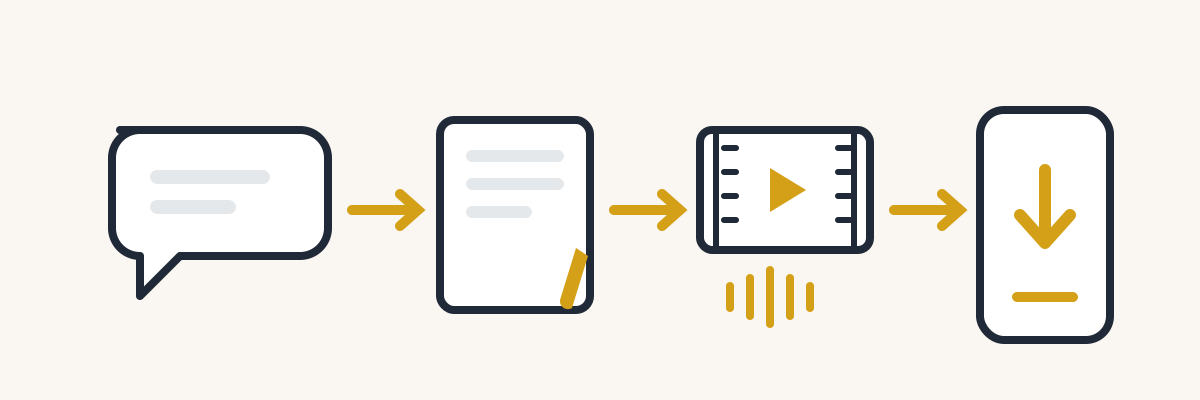
- Brief it. Type one sentence - "a short on why compound interest feels slow" - or paste a paragraph you already wrote. The agent writes the script and shot list first, before anything renders.
- Edit for free. Rewrite lines, cut a shot, change the voice or the visual style. Editing costs nothing and there's no limit on it. Credits only get spent when you approve the render.
- Render. Visuals, a studio voiceover and word-level captions are produced together. A 60-second video comes back in about a minute.
- Pick the format. 9:16 for Shorts, Reels and TikTok, 16:9 for YouTube, 1:1 for feeds. No redoing the script when you switch.
- Download. The MP4 has no watermark on any plan, free included.
There's also a whiteboard explainer format if your content is more "explain a concept" than "faceless channel," and a social agent that repurposes a finished video into posts for seven platforms.
The cost that matters more than the subscription
People compare these tools on monthly price, and that's the smaller number. The bigger one is your time per finished video.
Say a short takes you four minutes of prompt-writing per clip, six clips per video, then a voiceover pass, a caption pass and an export check. You're at an hour plus per video if nothing goes wrong - an illustrative estimate, not a measurement - and something always goes wrong. Three shorts a week is a part-time job.
A pipeline tool flips that: your time goes into the brief and the script edit - the parts that actually need your taste - and the rest is mechanical. My estimate is ten to fifteen minutes per video once you know what a good brief looks like. At channel scale, that difference is the whole ballgame. A $9.99 plan you use beats a free tier that costs you five hours.
A realistic weekly workflow
Here's the cadence I'd suggest if you're starting a channel this month:
- Sunday: write down five video ideas. Not titles - ideas. "Why nobody finishes online courses" beats "5 productivity tips."
- Monday: brief the two strongest and read the scripts out loud. If a sentence sounds wrong spoken, rewrite it. This is the step that decides whether the video works.
- Tuesday and Thursday: render, download, upload. Same time each day if you can - the upload habit matters more than the tool.
- Saturday: look at retention, not views. If people leave in the first three seconds, your hooks are the problem, not the algorithm.
Two finished videos is exactly what the free plan covers, so you can run the first week of this without paying anything.
What the free plan includes
Vidmoro's free plan is $0, no card, and gives you enough credits for about two finished videos. A finished video costs 300 credits, whatever kind it is. Paid plans start at $9.99 a month for about 20 videos - the current numbers are on the pricing page.
Two videos is enough to judge the output on your own topic. It's not enough to run a daily channel, and I won't pretend otherwise.
Limits worth knowing before you sign up
- Videos run 30, 60, 90 or 120 seconds. If you need long-form, this isn't the tool.
- Voiceovers are US English only, in eight voices.
- There's no model picker. That's deliberate - the pipeline chooses for you - but if you want to A/B test Kling against Sora, OpenArt is honestly the better fit.
So which one should you pick?
Pick OpenArt if you're a visual creator who wants a big model toolbox - image generation, cinematic clips, character consistency, experimentation. That's what it's built for, and it's good at it.
Pick Vidmoro if you're running a faceless channel and the bottleneck is turning ideas into finished, captioned, voiced shorts every day. That's the whole product.
And if you're not sure, the test is cheap: take your strongest video idea, run it through the free plan, and watch the first three seconds of what comes out. If the hook wouldn't stop your own scroll, you've lost twenty minutes. If it would, you've found your workflow.
FAQ
Is Vidmoro really free? The free plan is $0 a month and doesn't ask for a card. It covers about two finished videos. After that, plans start at $9.99.
Is there a watermark on the free plan? No. Per the pricing page, MP4 exports are watermark-free at every plan.
Can I use my own script? Yes. Paste it in and the agent builds the shot list around it. Editing the script is always free.
Can Vidmoro make long videos or non-English voiceovers? No. Videos are 30-120 seconds and voices are US English only. If either is a dealbreaker, check that first on any tool you try.
Does OpenArt have a free plan? OpenArt offers free generations and paid plans starting around $13-14 per seat per month at the time of writing - check their pricing page for current numbers, since promotions change often.
New to faceless content? Start with Free Script to Video AI With No Watermark.